Inside the Databasin platform
Databasin gives teams a common path from source data to questions, applications and automated work. Connectors, preparation tasks, open tables and governed access work together. Our team implements that path around the business outcome, while your engineers can inspect the queries, definitions and runs behind it.
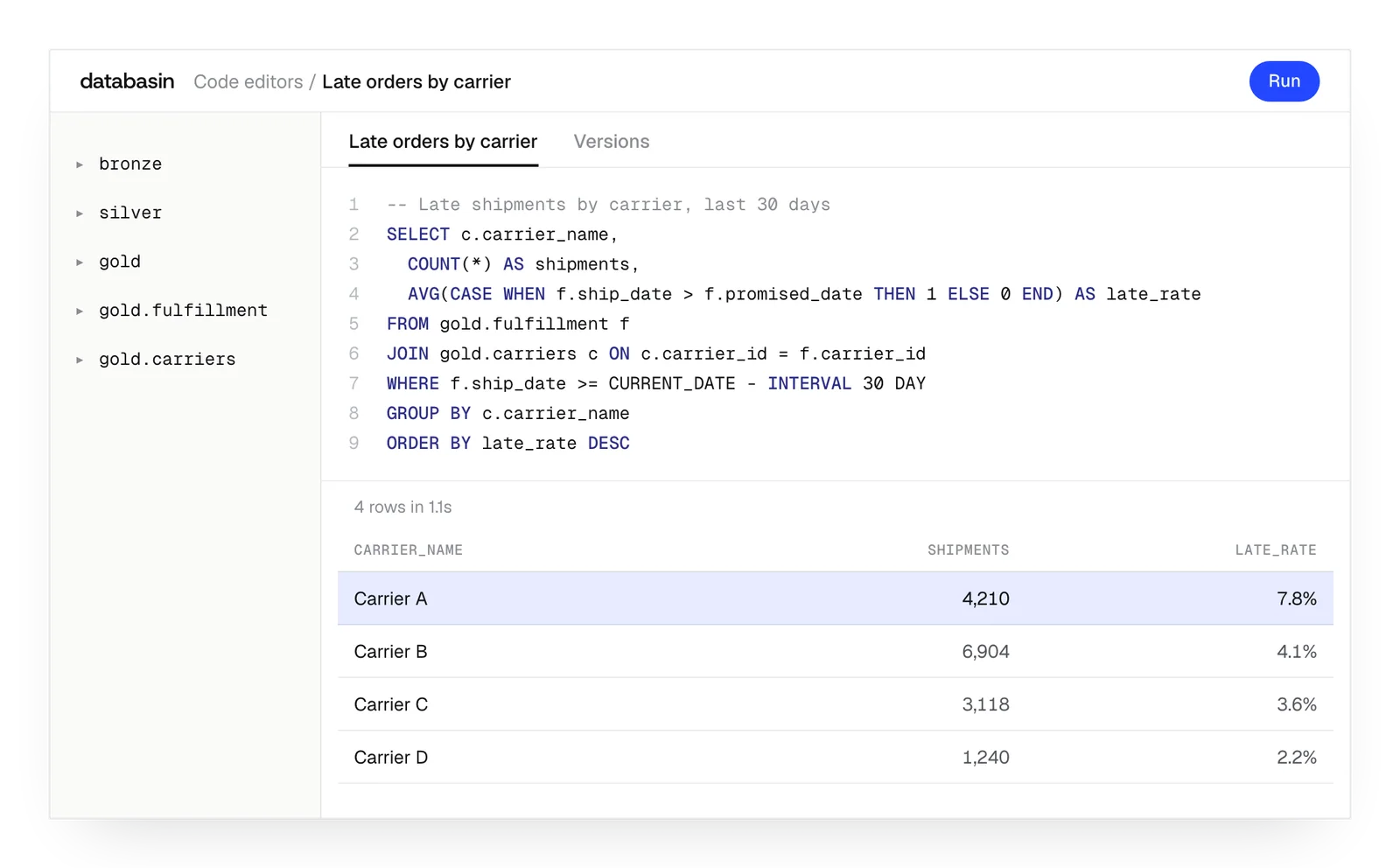





Shared preparation and business definitions
Databasin builds business views once for use across applications and analytical tools. The view contains the records and calculations needed for its question. A Data App and a BI report can query that preparation and use the same measure.
The work can then repeat on a schedule. An automation syncs the source before a transformation prepares it for an investigation. Its logs show the tasks that ran, so an engineer can locate a problem before examining the resulting analysis.
The path through the platform
Connect
Read the source
For each source, we choose between the supported reading routes. A live query reads directly from the source. A sync brings records into the lakehouse, where the team can retain history and use them in recurring analysis.
Connected sources with defined reading and refresh routes
Prepare
Schedule the work
We arrange preparation tasks into stages. Tasks in one stage run together; the next stage follows them. This allows a pipeline to supply records for SQL, dbt or notebook work, with retries and a log for each task.
Repeatable preparation with a record of each run
Store
Build shared views
Bronze holds raw records, silver applies cleaning and business rules, and gold presents the measures used in analysis. Compatible engines read the open Iceberg tables. The retained layers let engineers trace a business result through the work that produced it.
Governed business views with traceable source records
Use
Ask and investigate
People use the prepared views through Data Apps, SQL, notebooks and Databasin One. Plain-language answers include the SQL used to calculate them. A read-only agent can repeat an investigation, with limits on its run and a record of its activity.
Applications and answers that people can inspect
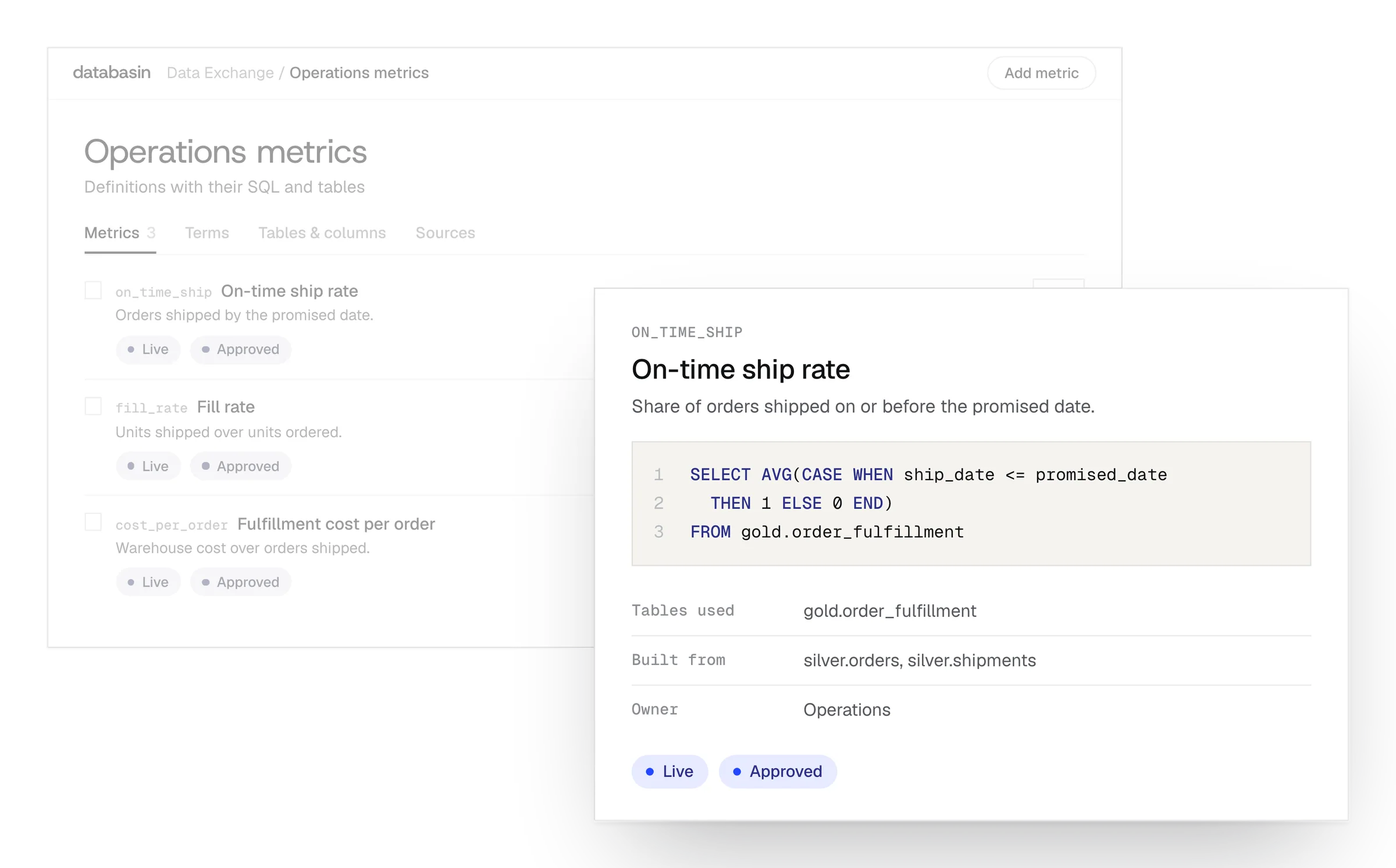
Example: tracing an operating measure. An analyst follows its definition to the query and prepared tables.
Design, Build, Run
We take responsibility for the work from defining the outcome through implementation and ongoing support.
Design
We define the outcome, current processes and expected return with your stakeholders. A working example shows how Databasin would answer your business questions.
Build
We get your first use case live in 90 days. Communication, rollout, training and success measurement are included in the work.
Run
Choose the help you need after launch. We can run the solution for you, provide monthly support hours or stay on call.
Security for business data
Databasin gives your team controls for who can use business data and records of how they use it.
Access
Your organization manages the identities people use to sign in. Data permissions apply to their work, and investigation agents have read-only access to production sources.
Regulated data
For work involving PHI or HR data, our team helps your security reviewers examine the requirements. Databasin is HIPAA-ready, with a BAA available.
Where data sits
You can use our hosted service, run Databasin in your Azure environment or use it alongside Databricks, Snowflake or Microsoft Fabric.
Audit
An answer comes with its SQL for review. Your team can also examine query logs and lineage to understand the data behind it.
What happens next
We would like to hear where your team wants to make progress with data and AI. We can discuss a project you have in mind or explore where Databasin could help with the work.
What happens next
Book a demo
Book a conversation about your organization and the work you want to improve. Questions about where to start are welcome.
Explore the opportunity
We show a working example that answers your business questions, then discuss what it would take to deliver it for your team.
Get the first result
After agreeing the first use case, we implement it with your team. We train the people using it and measure how it performs.
FAQ
Is live querying available for every connector?
Not yet. The product identifies the native connectors that currently support live access. Sync is supported across the connector library and provides retained records in the lakehouse for recurring work.
Can an automation use our dbt Core repository?
Yes. Add the repository as a dbt task. Databasin generates its profiles and reports status by model. The task can follow source preparation and supply transformed records to the next stage.
Can we keep external Databricks jobs in the workflow?
Yes. The automation can trigger a Databricks job as part of its task sequence. API calls and webhooks can also connect external work, with the other preparation tasks arranged before or after it.
Which engines can query the lakehouse?
Trino supports interactive SQL and federation. Databasin Sail supports Spark Connect, Spark SQL and PySpark on the open tables. Apache Doris and DuckDB are also available for teams that use those engines.
What happens to the first query after compute stops?
The cluster must start before the query can run. Someone opening an application after a quiet period may see that delay. We consider the pattern of interactive and scheduled work when configuring compute.
Can we use an internally approved AI model?
Yes. Databasin supports internally approved models as well as different model providers. The deployment design establishes the endpoint and the route it uses to query governed data, with your technical team involved in that choice.
Can people inspect evidence from documents as well as tables?
Yes. The reader can open the cited page behind a document answer and examine the passage. For an answer calculated from tables, the SQL provides the evidence of how the result was produced.
Is the PostgreSQL OLTP mode available now?
OLTP mode is coming soon. The planned PostgreSQL database would sit alongside the lakehouse for application writes. Current analytical work uses the available source connections, open tables and query tools described on this page.
Discuss your data architecture
Talk with us about the systems your team uses and the work you want to support. We can explore the source routes, preparation and applications that would make Databasin useful in your environment.