Let the morning reports build themselves.
Most companies have someone who starts the week by downloading three CSVs, pasting them into a workbook and emailing it around before the 9 o’clock meeting. We’ve met a lot of them, and we built this so they can stop.
Pipelines and automations do that part now. Your data syncs overnight, the models rebuild, an agent checks the numbers, and the report is waiting in Slack when people get in. The person who used to build it can spend Monday on something else.
$50 credit · No card · Your first pipeline in minutes
What a scheduled morning run looks like
An automation is a set of stages. Tasks in a stage run together; stages run in order, so the agent only reads numbers that are already fresh. We built it that way after seeing too many “insights” written about yesterday’s half-loaded data. Here’s what a typical morning looks like.
See the numbers
| Task | Type | Starts | Ends | Minutes |
|---|---|---|---|---|
| Salesforce sync | Pipeline | 6:00 | 6:14 | 14 |
| NetSuite sync | Pipeline | 6:00 | 6:11 | 11 |
| Rebuild the finance models | dbt | 6:14 | 6:22 | 8 |
| Revenue anomaly check | Agent | 6:22 | 6:25 | 3 |
| Data-quality sweep | Agent | 6:22 | 6:27 | 5 |
| Exec summary to Slack | Delivery | 6:27 | 6:28 | 1 |
Three people who stop doing it by hand
I spend every Monday rebuilding the same spreadsheet.
Pipelines keep the data current on a schedule, with history and change tracking. The spreadsheet becomes a Data App that’s always up to date.
I find out a feed broke when the CEO asks why the number looks wrong.
Every run is logged, and failed steps retry on their own. When something does fail, it explains what went wrong in plain English, usually before anyone opens the dashboard.
Can the report just arrive?
It can. Delivery sends the summary, the charts or the spreadsheet to email, Slack or Teams on your schedule.
Syncs, SQL, agents and delivery, all in one automation
Pick from the menu and drop it into a stage. There are no scripts to maintain and no second scheduler to keep in sync. We kept every job in one place because jobs split across two schedulers tend to fail in the gap between them.
- Bring data inPipelines from 75+ sources, file drops, unzip and copy jobs.
- Shape itSQL scripts, dbt projects, notebooks and semantic models.
- Think about itAgents that check and explain, forecasts, and OCR that turns a folder of PDFs into a table.
- Send it onReports to email, Slack or Teams, and Databricks jobs if you already run them.
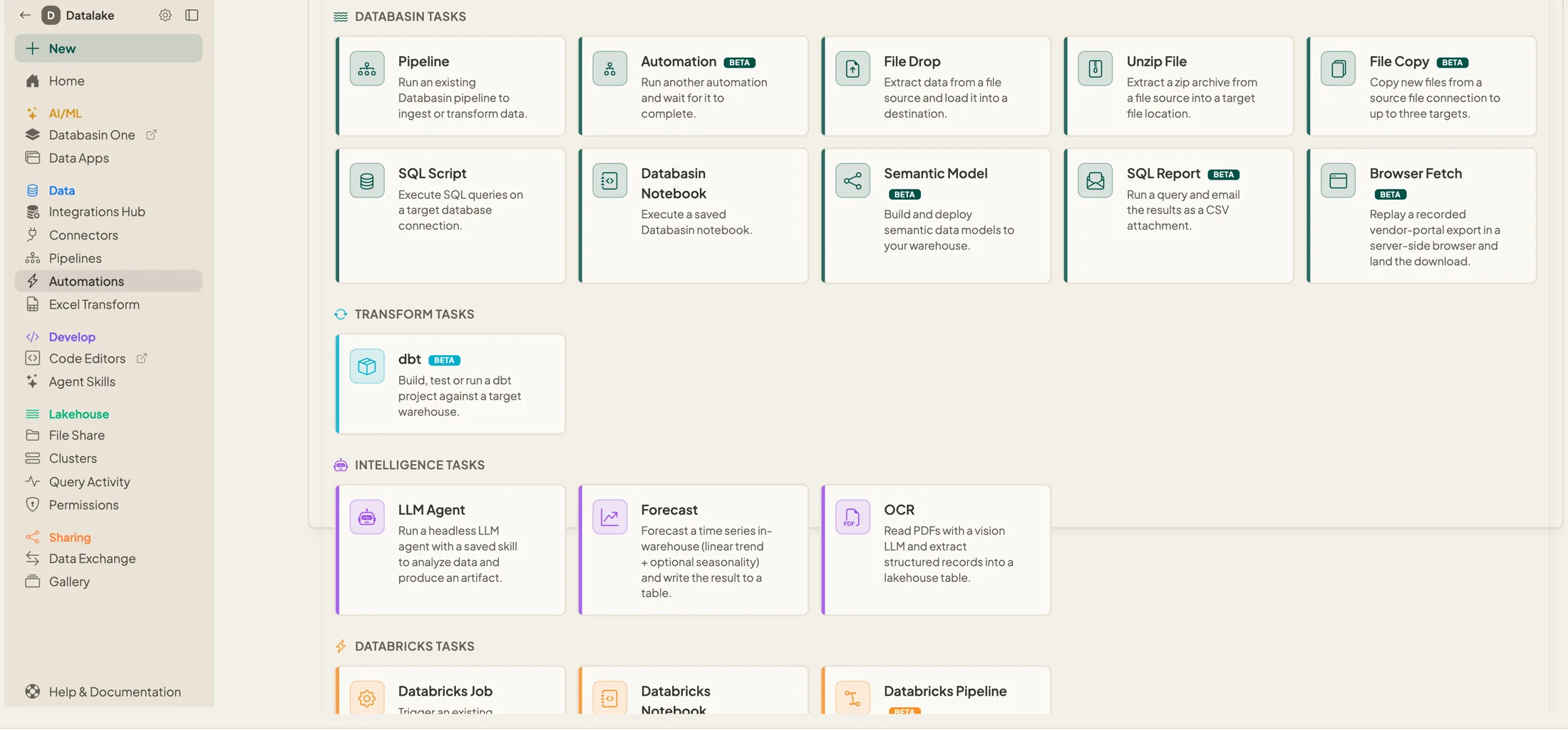 The task menu. Each one is a building block for a stage.
See every job and how its last run went
Each automation shows when it last ran and whether it worked. Runs retry on their own, every task keeps its own log, and every version of the automation is saved, so you can always see what changed and when.
Run it on a schedule, on a trigger, or once by hand while you test it. One limit to plan for: an automation is only as fresh as its slowest source, so a vendor API that updates once a day still updates once a day.
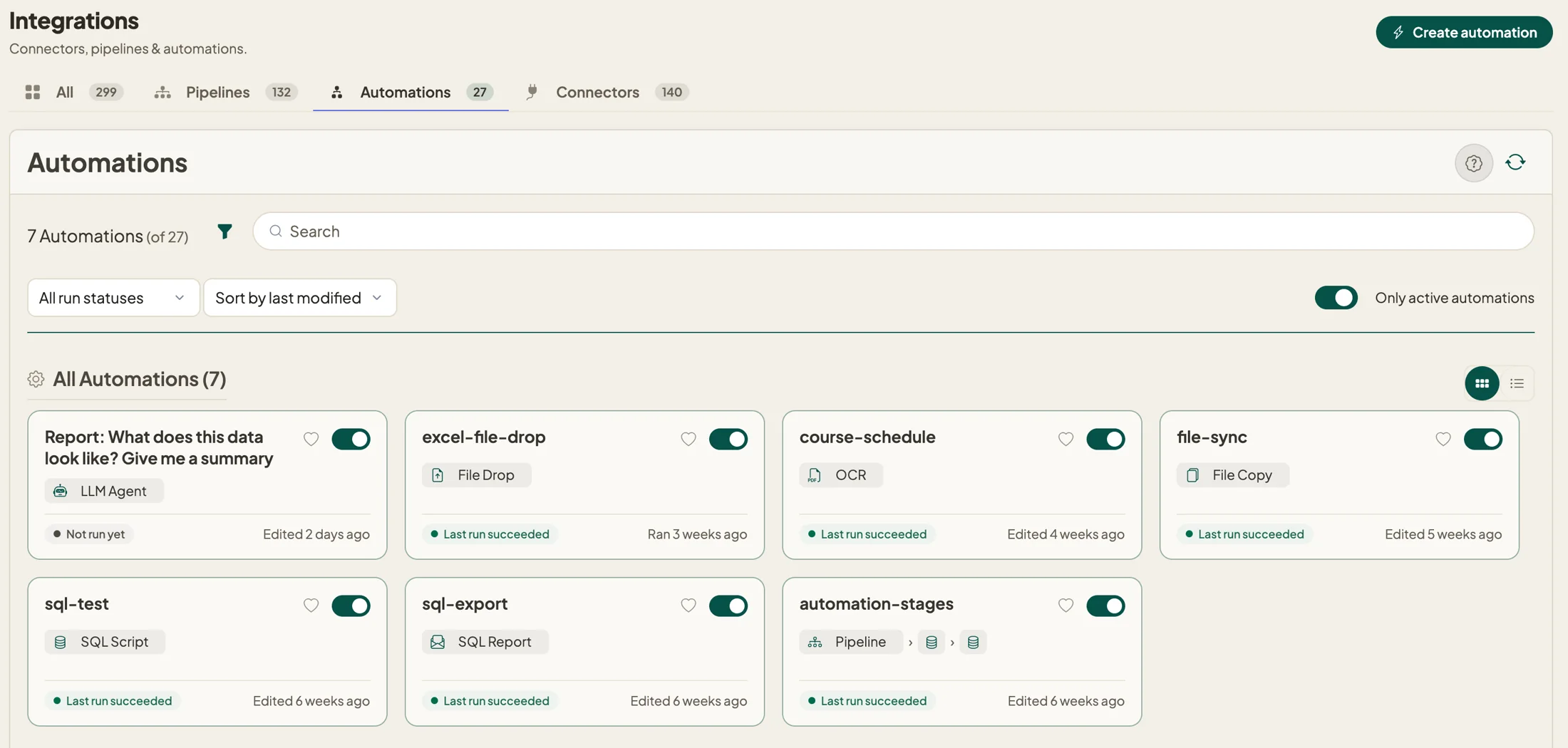 Seven automations, each with its last run on the card.
For the technical readerHow pipelines workEvery task typeAgents
Tell us about your Monday report, and we’ll help you automate it.
$50 credit · No card needed · Cancel anytime