Write the job in plain English. An agent runs it on schedule.
Nobody's job is watching a dashboard. Write the rule in plain English. An agent checks your data on your schedule and tells you, with the query behind it, only when something's real.
$50 credit · No card · Your first agent running in an afternoon
In production at WashU Medicine, Saint Louis University and other regulated institutions · HIPAA-ready · Hosted and run by us
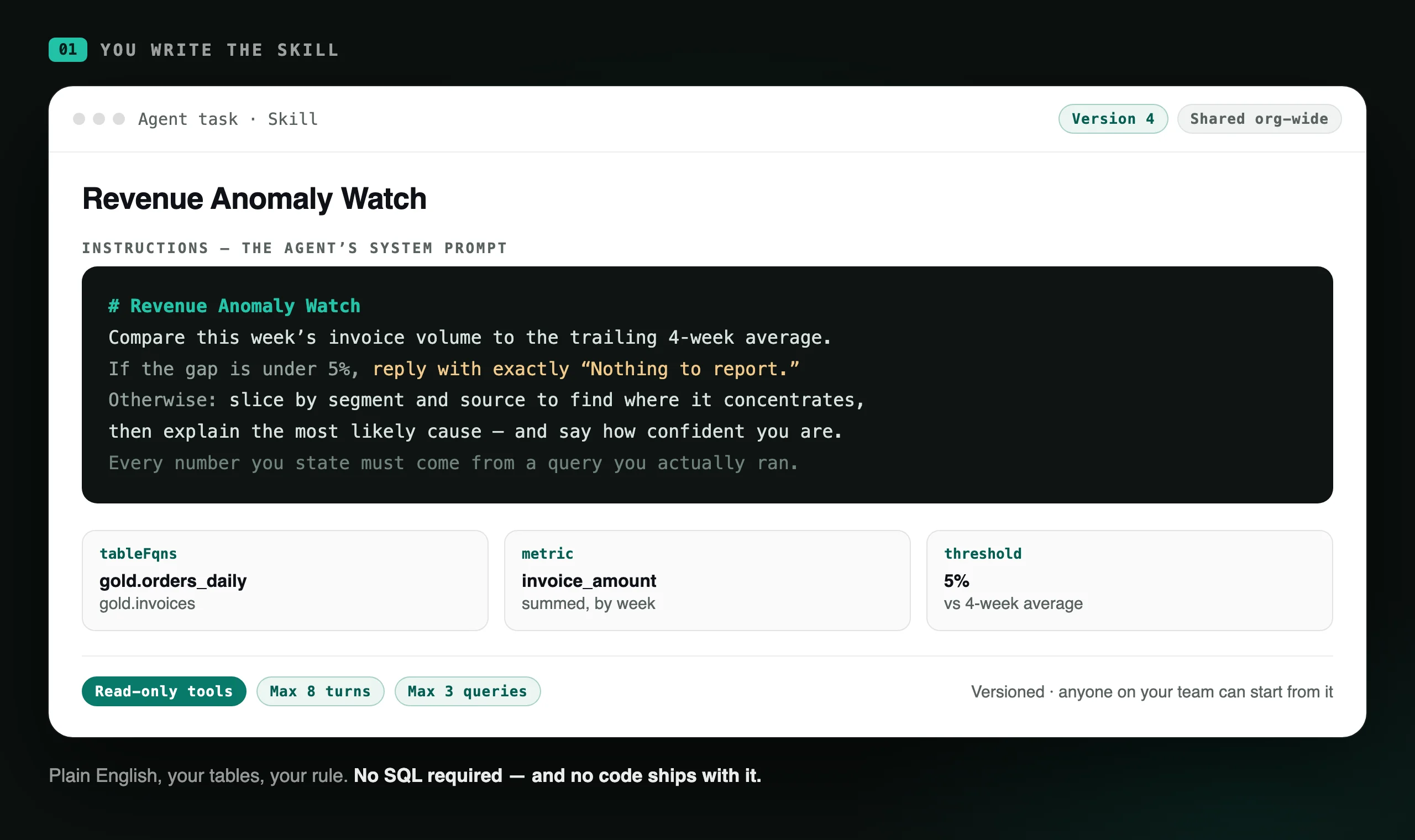
01You write the skill
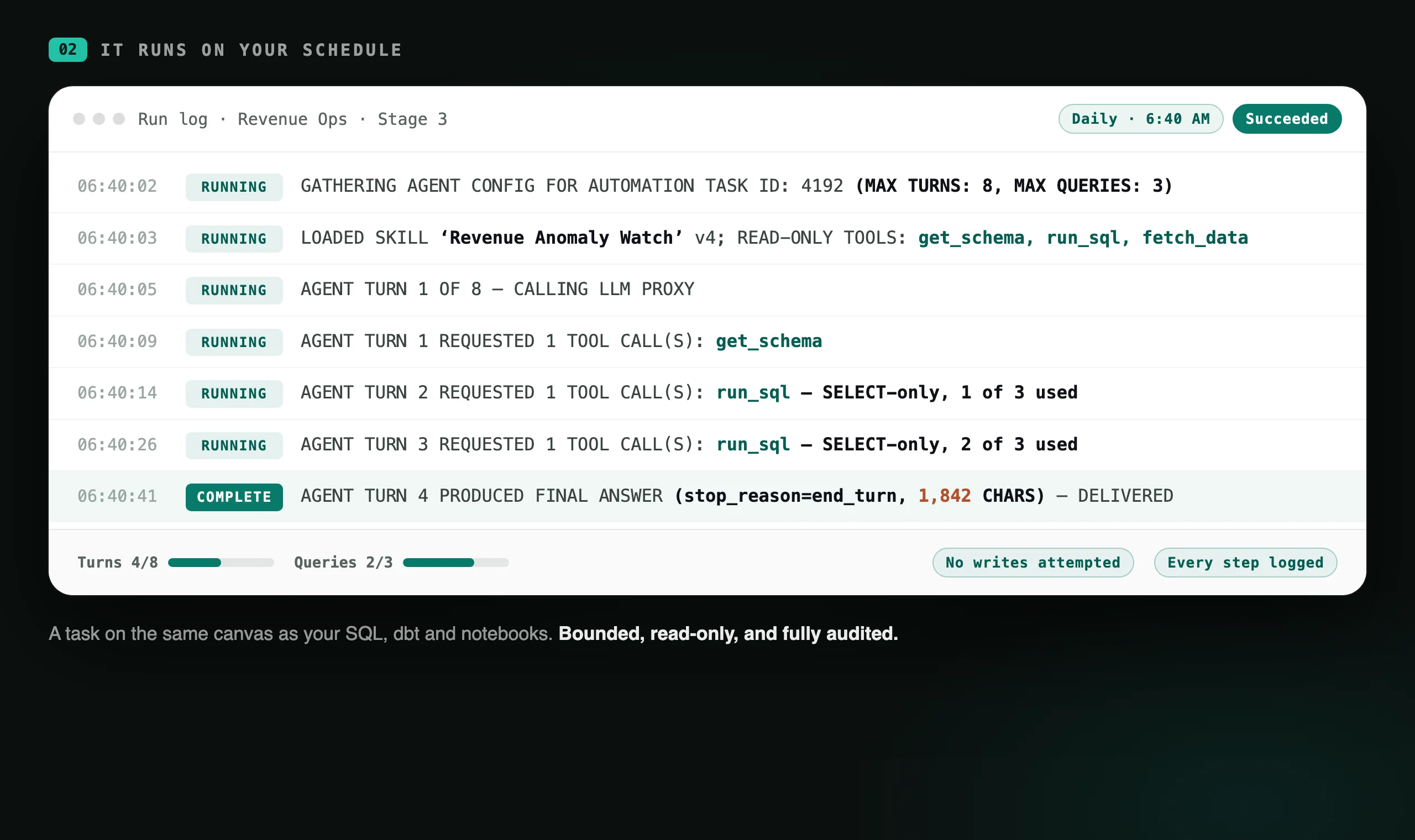
02It runs on your schedule
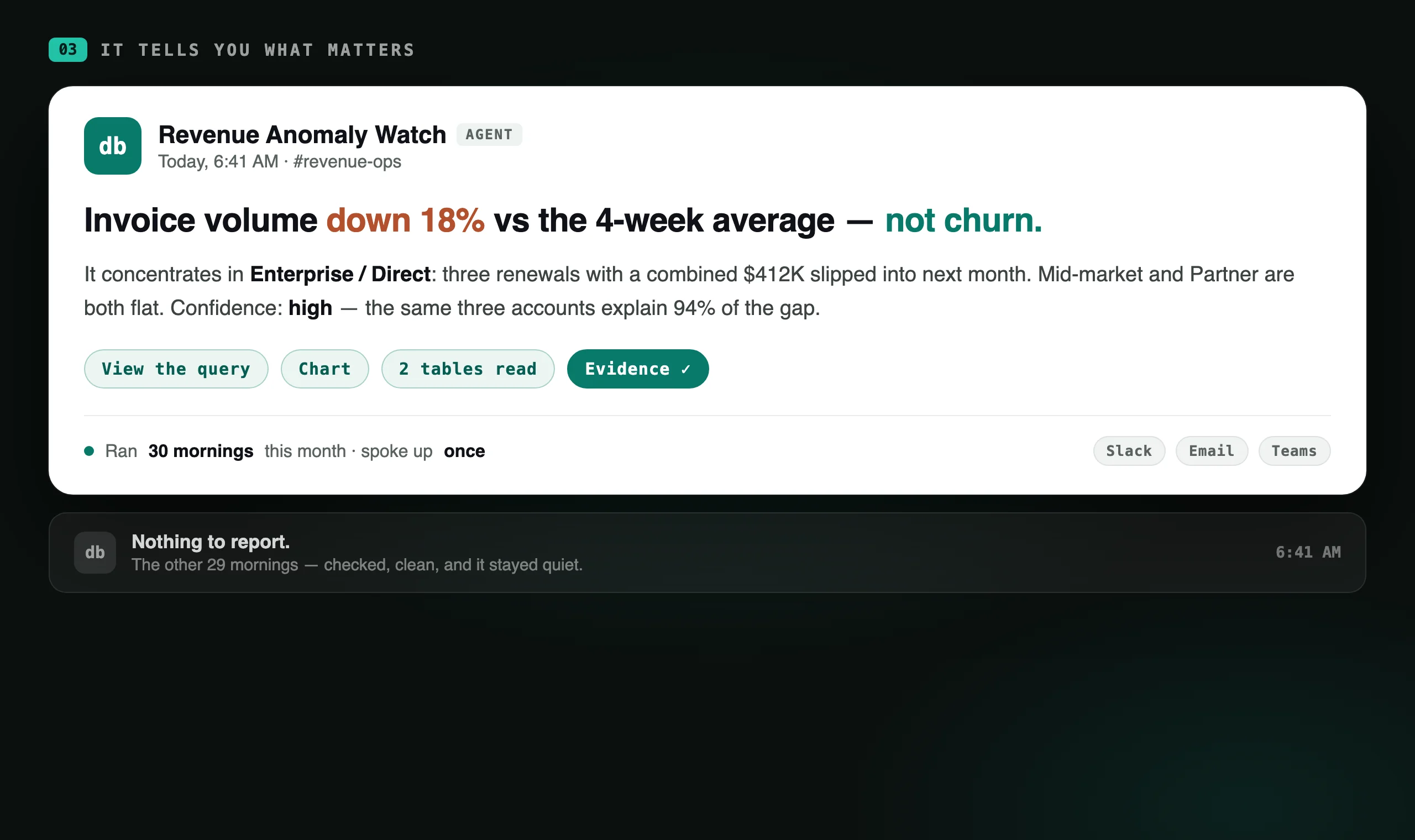
03It tells you what matters
01
You write the skill.
Brief it the way you'd brief a new analyst: what to look at, what counts as worth reporting, and what to do about it. The tables come from a picker. Set the bounds and save.
“If the gap is under 5%, reply with exactly ‘Nothing to report.’ Otherwise: slice by segment and source, then explain the most likely cause, and say how confident you are.”
Not sure where to start? Describe what you want and Databasin drafts the skill for you. Then you edit it like any other.
02
It runs on your schedule.
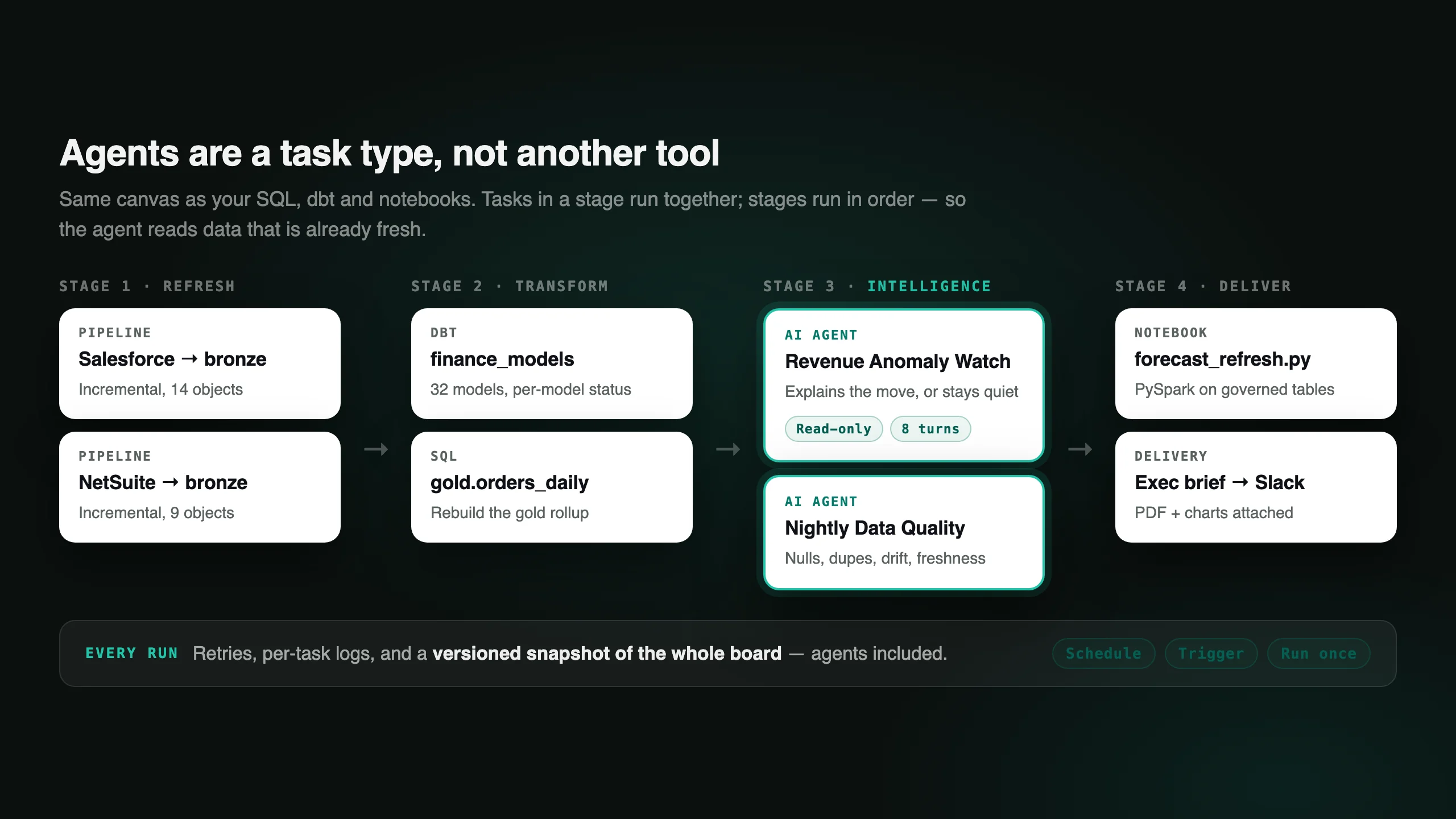
An agent is a task on the same canvas as your SQL, dbt and notebooks. Drop it into a stage after your pipelines refresh and it reads data that's already current.
It gets read-only tools, a query budget, and a turn limit. Every step lands in the run log: which skill and version, which tools it was offered, every query it spent, how it finished.
03
It tells you what matters.
The finding goes to Slack, Teams, or your inbox, carrying the number, the cause, the confidence, and a link to the query behind it. It tells you what changed and why.
And on the mornings when nothing's wrong, it says so and gets out of your way.
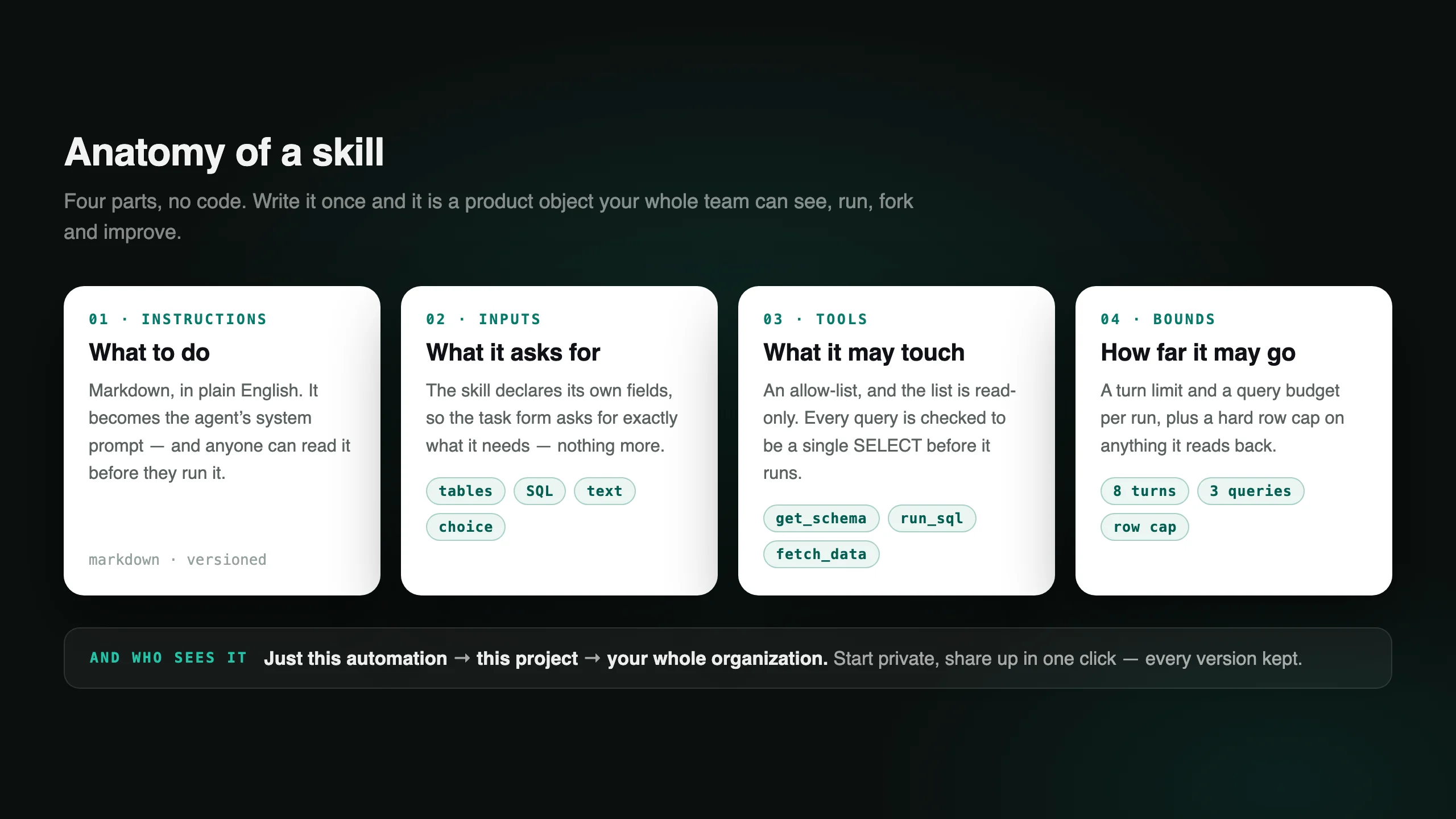
What goes into a skill
A Databasin skill is something your whole team can work with: you can read it before you run it, copy it under your own name, change it, share it, and roll it back. It’s written in plain text, so the person who knows the business best can write it.
Three skills included, and as many more as you need
Every account ships with three curated skills, ready to run. Pick one, name your own copy, point it at your tables, and you're running in minutes. When we improve the original, your copy tells you an update is available and you decide whether to take it.
Executive summary
Reads the fresh numbers and writes the narrative: one headline takeaway, three to five metrics with context, what moved and why, and two or three concrete next steps.
Monday, 7am, already in Slack
Data-quality sweep
Profiles a table for null rates, duplicates on your key columns, impossible values, and freshness. Then it rates the table Good, Fair or Poor and ranks what's most likely to break your reporting.
Nightly, before anyone opens a dashboard
Anomaly & root cause
Confirms the metric really moved against a baseline, drills down by every dimension to find where the change concentrates, then ranks the likely causes with the evidence for each.
Whenever the number looks wrong
After that, write your own and keep writing: a renewals watch, a census check, a grant-burn monitor, a nightly reconciliation. There is no cap on how many you run, and the best ones are usually the ones only your business would think to ask for.
Two tasks that work alongside agents
Two more task types sit beside the agent on the same canvas, with the same schedule, retries and logs. One of them deliberately spends no tokens at all. The other spends them on the one job a model is genuinely better at than any rule you could write. Both hand their output to whatever runs next.
Forecast, then explain it
The forecast is not a guess from a model. Databasin generates SQL for your engine and runs it in your warehouse: a linear trend, optional seasonality, and a 95% prediction interval, written to a table. No tokens, no drift, the same numbers every time you ask. An agent then reads that table and writes the part a number can't say for itself: what moved, what it means, and what to do about it.
Run it twice, get the same answer twice
Read the documents
Declare the fields you want and describe what each one means. A vision model reads every page of every PDF and appends one row per record to a lakehouse table. Layout doesn't matter, because it finds the data by meaning rather than position: the same task handles a supplier who moves the table every quarter. Each run picks up only what arrived since the last one.
Invoices, statements, catalogs, scanned reports
Neither replaces the agent. They feed it. The forecast gives it numbers worth trusting; the extractor gives it rows that were locked in a filing cabinet an hour ago.
An agent is just another task type on the canvas.
Agents live inside the automations you already build. That's what makes them trustworthy. The agent runs after the pipeline that feeds it, on the same schedule, with the same retries, logs and versioned snapshots as every other task on the board.
The guardrails we built in
You can put this on a schedule with confidence because what an agent can touch is small on purpose. A bad prompt produces a bad report, never a bad write. We decided early that an agent should never be able to change your data, and we haven’t regretted it once.
Read-only tools, period
An agent gets three: get_schema, run_sql, fetch_data. A skill can narrow that list; nothing can widen it.
SELECT-only, verified
Every statement is checked before it executes. Anything that isn't a single SELECT is rejected by the runtime, not by the prompt.
Budgets you set
A turn limit and a query budget per run, plus a hard row cap on everything it reads back. Runaway loops aren't possible.
Governed data only
The agent queries whatever connection the task points at, and it inherits that connection's permissions. That means your gold layer, not raw tables.
A record of every run
Skill and version, tools offered, each turn, each query, how it ended, and the report it produced. All of it stored with the run.
Your model, your key
Claude or GPT, pinned to a connector you own. On Databasin Private? Your tenant, your LLM, billed to you with no markup.
Versioned like code
Every save snapshots the skill. Compare versions, pin one, or roll back. The automation keeps running the version it was given.
Clear, metered pricing
Runs bill like everything else: published per-minute rates plus the tokens the run actually spends. Stop the schedule, stop the meter.
Start private, then share when it works.
A skill you tune inside an automation belongs to that automation, so nobody else is affected while you're still getting it right. When it earns its keep, widen it in one click.
Just this automation
Your copy, your tuning. Invisible in everyone else's picker, and editable right where you use it.
This project
The team working on this data can pick it up, run it, and fork their own variant.
Your whole organization
Every project sees it. Admins get a governance view of what people actually built, and they can promote the good ones.
No admin ticket required. Anyone who can work in a project can write a skill. That's deliberate, because the person who knows what "worth reporting" means usually isn't the admin.
Some questions want a page people can open any time rather than a message on a schedule. Those become Data Apps: start from any answer in Databasin One, choose Make Data App, and share the link.
What agents don't do.
Worth knowing before you plan around them.
They don't write to your data.
There's no setting to flip, because the tools simply aren't there. Write-back and delivery are separate, explicitly configured steps that run after the agent finishes.
They don't act on their findings.
An agent produces a report. Opening the ticket, adjusting the forecast, emailing the customer. Those stay with you, or with a task you wire up deliberately.
They don't run forever.
Each run is bounded by your turn and query limits. It runs on a schedule with a fixed budget, and never keeps running in the background.
They don't replace your judgment.
Every claim comes with the query that produced it, precisely so you can check the ones that matter. The query is always attached, so you can check any number you rely on.
Set up your first agent this afternoon.
Just your email. We'll build your workspace and send your sign-in link.